WorshipDeck vs MediaShout
Web-based church presentation software compared with MediaShout's one-time Windows or Mac site license.
| WorshipDeck | MediaShout | |
|---|---|---|
| Install and devices | Browser; optional Android TV + Windows host | Win 7 or Mac 6 apps |
| Where the library lives | Church cloud workspace | Local + site license |
| Team prep during the week | Invite, shared library, browser | Copy to each licensed PC |
| Live edit without stopping screens | Yes, from present mode | Typical desktop cue workflow |
| Scripture and songs | Church Bibles; catalog + My songs; no SongSelect | 70+ Bibles; SongSelect |
| AI and media tools | Ezra, Media AI, animate image | Optional paid media memberships |
| Outputs and multi-screen | Local browser, Android TV, Windows host; variants | Control / main / stage |
| If the booth PC fails | Sign in on another device | Need another licensed PC |
| Pricing model | Subscription; same features, capacity differs | One-time site license + optional Plus |
| Best fit | Volunteer teams, Chromebooks, shared library | Own-the-license booth churches |
MediaShout is the church presenter you buy as a site license — and you pick Windows 7 or Mac 6 as separate apps. WorshipDeck is a web-based alternative to MediaShout when you want one product in the browser and a library that lives with the church, not on each licensed PC.
Who MediaShout is for
MediaShout is desktop cue software for Sunday: lyrics, media, Bibles, and control / main / stage displays. Official pages describe 70+ Bibles, CCLI SongSelect on the Windows 7 listing, and a one-time site license for unlimited computers of that operating system. Optional Plus and Complete memberships add yearly support and media. Files still live on the machines unless the church invents its own sync.
That is the right tool when owning the booth install is the point: train volunteers on that PC, keep Sunday on Windows or Mac as two different products, and skip a monthly presenter bill.
Choose WorshipDeck if
- You want to prep on a Chromebook, tablet, or home laptop without installing a presenter
- The church should have one library, not a copy on every licensed PC
- You do not want a split Windows 7 / Mac 6 license
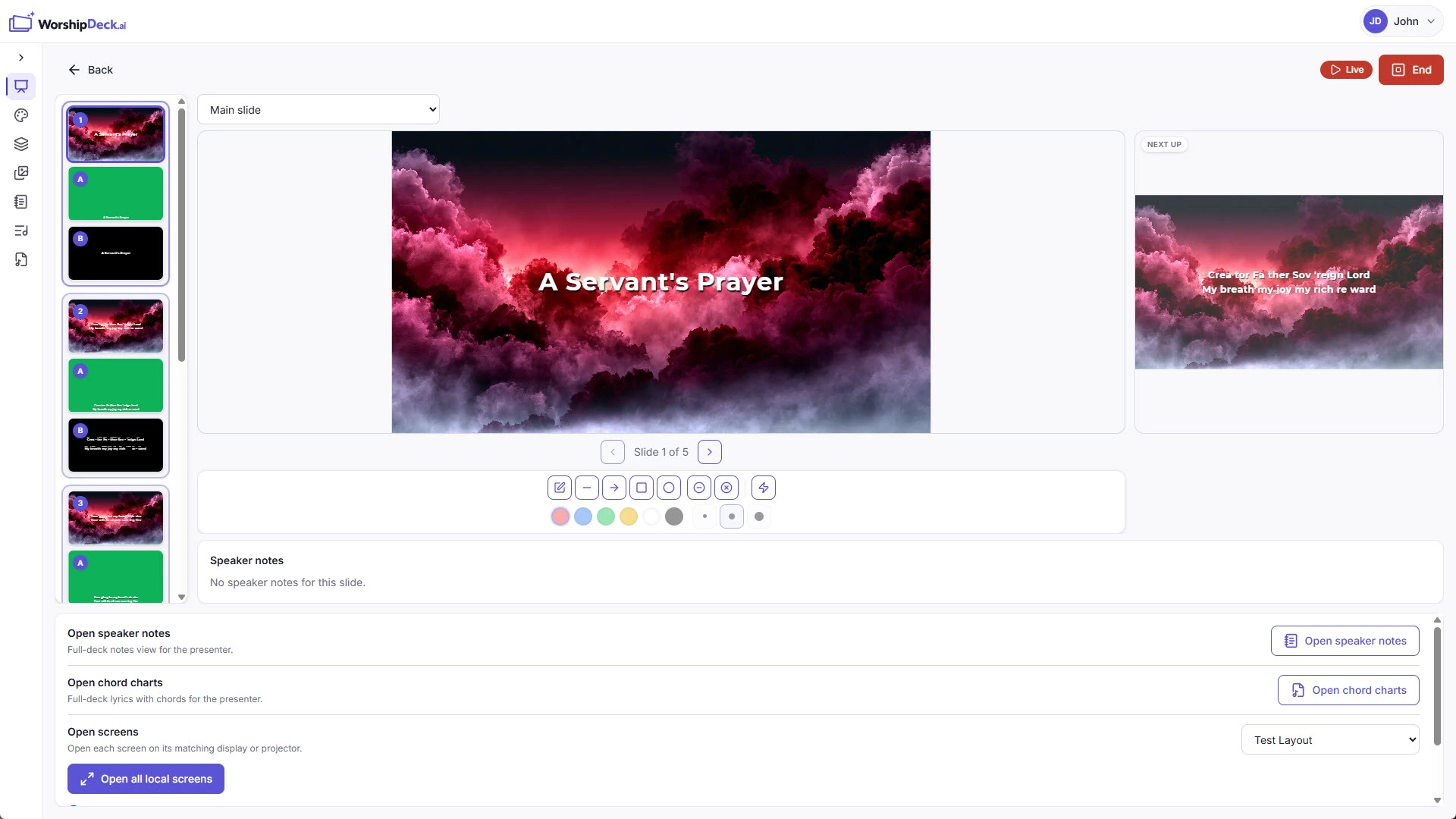
- You need Ezra, live edit from present mode, and Android TV outputs
- Team members should build decks during the week from wherever they already work
Choose MediaShout if
- You want a perpetual site license and prefer to own the booth software outright
- Sunday-emergency phone support add-ons matter more than a browser workspace
- SongSelect on the installed presenter is a requirement
- Volunteers already know MediaShout cues and you are not changing the booth PC
Switching notes
There is no MediaShout file importer in WorshipDeck. Rebuild lyric and sermon decks in the presentation editor, or start from songs and sermon notes. Windows 7 and Mac 6 are separate MediaShout products — do not assume one show file opens on the other OS.
WorshipDeck does not connect to CCLI SongSelect. Store CCLI numbers on songs if you need them on credits slides. See pricing for plan capacity; do not assume a dollar amount from this page.
Related comparisons
Churches weighing a production desktop should read WorshipDeck vs ProPresenter. Volunteer booths often compare WorshipDeck vs EasyWorship. If you already live in a Faithlife stack, see WorshipDeck vs Proclaim.
Related
WorshipDeck vs ProPresenter
Compare WorshipDeck and ProPresenter: web-based church slides and a shared library versus desktop live-production software for multi-screen and broadcast rooms.
WorshipDeck vs EasyWorship
Compare WorshipDeck's browser library with EasyWorship 8 for Mac and Windows volunteer booths.
WorshipDeck vs Proclaim
Compare WorshipDeck's browser workspace with Faithlife Proclaim's cloud-synced Mac and Windows app.
Live presentation without stopping the room
Run Sunday from a browser operator console. Preview before you go live, advance slides from the keyboard, annotate, and edit presentations or service order without interrupting congregation screens.